Training Center — IFPD Deployment for Hybrid Learning
Equipping 20 classrooms with MAXHUB interactive flat panel displays and unified communications integration for seamless hybrid learning experiences.
The Challenge
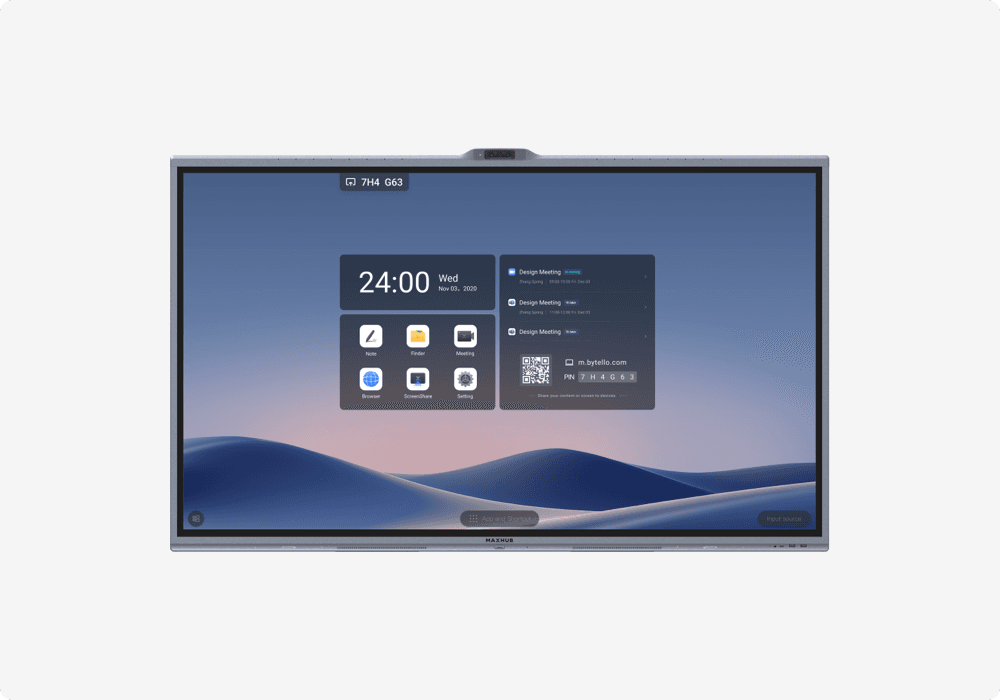
A corporate training center operated by a major enterprise needed to transition from traditional classroom-only training to a hybrid model supporting both in-room and remote learners simultaneously. The center's 20 classrooms were equipped with legacy projectors delivering poor image quality, limited interactivity, and no native video conferencing capability.
The shift to hybrid learning demanded technology that could deliver an equivalent learning experience for both physical and remote participants. Requirements included interactive display capability with touchscreen annotation, whiteboarding, and collaborative tools for engaging instruction. Built-in or integrated video conferencing for hybrid sessions. Wireless screen sharing for trainers and learners to present from their own devices. Simple, trainer-friendly operation without requiring dedicated AV support for every session. Standardized solution across all 20 classrooms for consistent experience and simplified training.
The Solution
VTL deployed MAXHUB interactive flat panel displays across all 20 classrooms, creating a standardized hybrid learning environment.
Interactive Displays: MAXHUB IFPDs (65-inch for standard classrooms, 75-inch for large classrooms and auditorium-style rooms) with 4K resolution, multi-touch capability, and integrated Android computing for standalone operation.
Unified Communications Integration: Each IFPD paired with a USB wide-angle camera with auto-framing for capturing the in-room audience, ceiling array microphones for clear audio pickup, integration with the organization's UC platform (Microsoft Teams), and split-screen capability showing remote participants alongside lesson content.
Wireless Sharing: MAXHUB wireless dongle system enabling trainers and participants to share screens from laptops, tablets, or phones without cables or dongles.
Annotation and Whiteboarding: Native MAXHUB whiteboard application for real-time annotation, drawing, and collaborative brainstorming with sessions saveable and shareable with remote participants.
Implementation
Phase 1 -- Assessment and Design (Week 1): Classroom-by-classroom survey covering room dimensions, lighting, seating layouts, and network infrastructure. Display size and peripheral specifications determined per room.
Phase 2 -- Infrastructure Preparation (Week 2): Network upgrades for bandwidth supporting 20 simultaneous video conferencing sessions. Power outlets and mounting points prepared.
Phase 3 -- Installation (Weeks 3-4): MAXHUB IFPDs installed and commissioned across all 20 classrooms. Cameras and microphones installed and calibrated. UC platform integration configured and tested per room.
Phase 4 -- Faculty Training (Week 5): Hands-on training sessions for all trainers covering basic operation, whiteboarding tools, launching hybrid sessions, wireless screen sharing, and troubleshooting. Quick-reference guides provided for each classroom.
Installation was scheduled during a planned training break to avoid disruption. Each classroom was tested with a live hybrid session before handover to verify complete functionality.
Results
| Metric | Result |
|---|---|
| Classrooms Equipped | 20 |
| Display Type | MAXHUB IFPD (65-inch and 75-inch) |
| UC Integration | Full (camera, microphone, platform) |
| Faculty Trained | All trainers (hands-on sessions) |
| Deployment Duration | 5 weeks (including training) |
Hybrid training sessions increased substantially as a percentage of total sessions. Trainer satisfaction with classroom technology improved significantly. IT support tickets for AV issues decreased due to simplified, standardized equipment. Training capacity effectively doubled with the same physical rooms now supporting both in-room and remote cohorts simultaneously. Remote learner engagement scores improved measurably, as indicated by participation rates and feedback surveys.
"Our trainers were initially skeptical about interactive panels replacing projectors, but within the first week, they were using features they never had before -- annotation, whiteboarding, seamless remote participant integration. The MAXHUB panels have genuinely transformed how we deliver training."
Equipping Classrooms for Hybrid Learning?
VTL provides MAXHUB interactive displays with end-to-end deployment capability including UC integration and faculty training.